0x01
Windows · .exev0.1.45ALPHAlink Software
Windows installer for ALPHA NextGEN calibration, datalogging and firmware updates.
Software, the COM port utility and the setup guide. Every file below was downloaded and checked: real sizes, real SHA-256 hashes. Trust, but verify.
Windows installer for ALPHA NextGEN calibration, datalogging and firmware updates.
Identify the emulator, datalog and debug COM ports in Windows. Run it and it tells you which COM port(s) to use in your tuning software.
Direct file from the ALPHA_NextGEN_Tools GitHub repo. The official downloads page links to GitHub's file page instead.
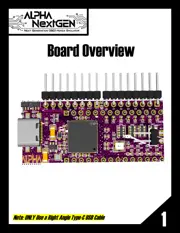
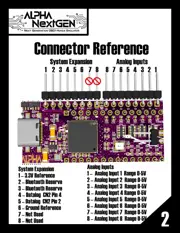
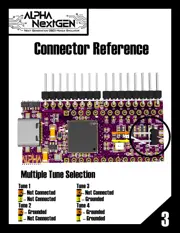
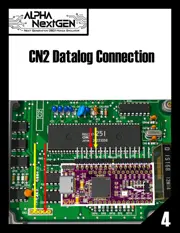
Seven-page installation and connection guide: board overview, connector reference, tune selection, CN2 datalog, USB cable install and PC setup.
On Windows, open PowerShell in the folder with the file and run Get-FileHash .\ALPHAlink_0.1.45_Setup.exe -Algorithm SHA256. The result should match the hash on the card. If it doesn't, don't run it; download it again from this page.
Four steps, straight from the NextGEN Basic Setup Guide. Click a page reference to see the diagram.
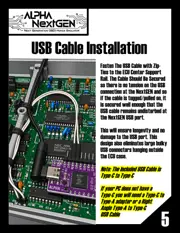
Zip-tie it to the ECU center support rail so there is no tension on the NextGEN USB port, even if the cable gets tugged. No Type-C on your PC? Use a Type-C to Type-A adapter or a right-angle Type-A to Type-C cable.
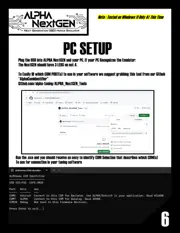
guide p.6 →Plug the USB into the NextGEN and your PC. If your PC recognizes the emulator, the NextGEN should have 3 LEDs on, not 4.
guide p.7 →Run AlphaComIdentifier.exe. It tells you which COM port(s) to use for the connection in your tuning software.
guide p.7 →Source: ALPHA NextGEN Basic Setup Guide v1. The guide notes it has been tested on Windows 11 only at this time.